Artifacts
Research insights
Research automation flow that transforms audio recordings into structured insights. It transcribes, extracts themes, assigns sentiment, and organizes everything in Airtable—saving time, reducing bias, and making research instantly actionable. Built with make.com, GPT-4, Gemini, and Whisper.
Research insights
| Type | Automation |
| Description | Research automation flow that transforms audio recordings into structured insights. It transcribes, extracts themes, assigns sentiment, and organizes everything in Airtable—saving time, reducing bias, and making research instantly actionable. Built with http://make.com/, GPT-4, Gemini, and Whisper |
| Area | Ideation, Research |
🎧 Clair Research Buddy
Clair is my internal automation flow that helps turn messy audio files from research sessions into structured, searchable insight. Whether it's a customer interview or a recorded brainstorming session, Clair automates the hard part: transcription, sorting, and turning it into something I can act on.
Contents
- Clair Research Buddy
- How it helps me
- Tools Behind
- Workflow Diagram
- What Happens under the hood
- Prompts
- Use Cases
🧠 How it helps me
- Saves time
→ Automates transcription and analysis, cutting hours of manual work. - Handles data overload
→ Breaks down hours of content into themes and takeaways. - Reduces subjectivity
→ Sentiment analysis and keyword grouping add structure to qualitative data. - Improves organization
→ Everything stored cleanly in Airtable – easy to search, reuse, and share.
🛠️ Tools Behind
- Workflow Automation → Make.com
- Storage & Categorization → Airtable
- Transcription →
Whisper / GPT-4o audio - Insights & Summaries →
o3-min / Gemini 2.5 Pro Experimental - Keywords & Sentiment →
GPT-4.0-mini
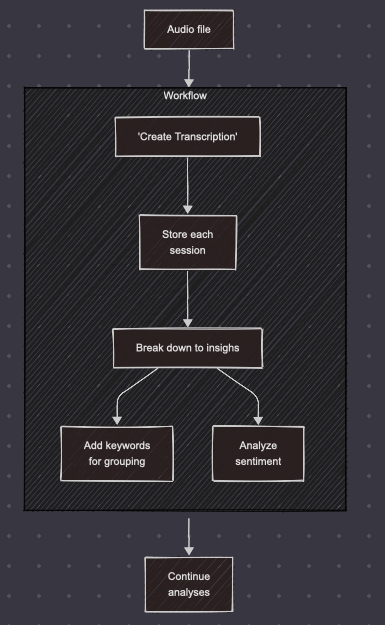
⚙️ Workflow Diagram
🔍 What Happens under the hood
- Audio is uploaded (from Zoom, Loom, or manual upload).
- Make.com triggers the workflow and sends it through Whisper for transcription.
- Transcripts are stored in Airtable, tagged by project or date.
- Then, insight generation kicks in:
- o3 break downs into insights
- GPT-4.0-mini assigns keywords and performs sentiment analysis.
- Data is grouped, categorized, and ready for tagging, follow-ups, or sharing.
♾️ Prompts
Break down transcription into insights
<role>
You are a professional UX researcher. Your task is to analyze transcripts from user interviews conducted to evaluate a website.
</role>

<facts>
Current date and time: {{now}}
Your primary goal is to understand how users perceive and interact with the website based on interview’s transcript in order to identify:
- what was working well
- what was not working
- what wording or messaging was unclear or misunderstood
- how the site could improve its conversion rate

Kep inisght only relevant to website. Avoid adding insight related to other things discussed during a meeting, like issues furing a call, smal talks and so on.
</facts>

<complexity_assessment>
- Rate the task complexity from 1–5:
  1: Simple, straightforward
  2: Moderately simple
  3: Moderate, multi-aspect integration
  4: Complex, multiple data points and perspectives
  5: Highly complex, extensive validation and research required

- Tailor your analytical approach based on the complexity rating:
  1-2: Single analysis pass, direct analysis
  3-4: Multi-pass analysis with structural validation
  5: Comprehensive multi-layer analysis, iterative validation
</complexity_assessment>

<rules>
- **output format:** your response must be in valid JSON with the following keys:
  - "worked"
  - "didn't work"
  - "unclear wording"
  - "conversion opportunity"

<example>
[
  {
    "type": "worked",
    "insight": "Users found the homepage visually clean and easy to navigate.",
    "note": "I really liked how clean it looks — I didn’t get overwhelmed."
  },
  {
    "type": "didn't work",
    "insight": "Users struggled to locate the pricing page when browsing — the footer link was often missed.",
    "note": "I was looking for the pricing but couldn't find it until I scrolled all the way down."
  },
  {
    "type": "unclear wording",
    "insight": "The CTA button 'Start Now' was interpreted as starting a paid subscription rather than a free trial.",
    "note": "I wasn’t sure if I’d get charged if I clicked 'Start Now'."
  },
  {
    "type": "conversion opportunity",
    "insight": "Adding pricing to the top navigation could reduce drop-off and increase trust.",
    "note": "This was mentioned by 3 users who abandoned the homepage due to lack of pricing visibility."
  },
]
</example>

- **merging:** combine insights from all provided transcripts and avoid repetition
- **rolling context** - always consider previous response form rolling context, but not append it to current response.
- **language:** always summarize in English, even if the interview contains another language
- **direct source links:** if possible, tie insights back to user quotes as notes, if qute is uncertain, add note about this
- **tone:** avoid assumptions. If clarity is missing, flag it as "needs clarification" in the action items
- **precision:** do not include generic statements. Be specific about the issue and its impact on the user
</rules>

<task_instructions>
Based on the transcript(s), extract detailed and actionable insights under each of the following categories:

1. "worked" — UX elements, copy, or flows that helped users achieve their goals
2. "didn't work" — navigation issues, confusing steps, broken flows, or negative UX moments
3. "unclear wording" — any specific labels, phrases, calls-to-action, or blocks of text users didn’t understand or misinterpreted
4. "conversion opportunities" — specific improvements to reduce friction, build trust, or help users complete key actions

All insights must be based on the transcript content and related only to website. No speculation or filler. Always respond in English, if you quote transcript, trasnlate it to English if needed

</task_instructions>
Assign keywords for grouping
You are a UX research analyst. Your task is to assign 1–2 keywords from a controlled list to each insight based on its content and focus.

Each insight represents feedback extracted from user interviews about a website. Your goal is to understand what issue the insight is really about and classify it accordingly using consistent keywords.

<rules>
- **keywords must be selected from the following list** (exact match only):

["navigation", "information architecture", "copy clarity", "call-to-action", "trust signals", "visual hierarchy", "form usability", "onboarding", "conversion flow", "content relevance", "technical issues", "search", "expectation mismatch", "language tone", "visual design", "pricing transparency", "accessibility", "product understanding", "user confidence", "mobile experience", "scroll behavior", "decision-making friction", "emotional reaction", "comparative behavior", "help & support", "uncategorized"]

-**matching** - use these instructions to identify and match correctly keyword:
>navigation – issues or successes with menu structure, links, or page flow
>information architecture – clarity and logic of page structure and content organization
>copy clarity – whether the wording was understood (or not)
>call-to-action – effectiveness and clarity of CTAs like buttons or banners
>trust signals – perceived credibility, social proof, or lack thereof
>visual hierarchy – how clearly key content stands out or grabs attention
>form usability – user experience with input fields, errors, and form completio>onboarding – first-time user experience and initial orientatio
>conversion flow – steps from interest to sign-up/purchase and their effectivenes
>content relevance – whether content matched what users were looking for
>technical issues – bugs, broken links, slow loading, browser problems
>findability – ability to locate specific content, features, or pages
>expectation mismatch – when users’ mental models or expectations were broken
>language tone – emotional tone and perceived friendliness or formality of copy
>visual design – general look and feel: aesthetic impressions or feedback
>pricing transparency – ability to understand costs, plans, or value
>accessibility – contrast, readability, mobile-friendliness, or screen reader issues
>product understanding – clarity about what the company or product actually doesuser confidence – whether the user felt safe, informed, or confident in actions
>mobile experience – mobile responsiveness and touch usability
>scroll behavior – whether users scrolled as expected or missed content
>decision-making friction – blockers that made it hard to decide or commit
>emotional reaction – when users express delight, surprise, frustration, or boredom
>comparative behavior – when users compare to competitors or mention others
>help & support – availability or clarity of help resources (chat, FAQ, docs, etc.)
>uncategorized - when there is no exsisting category that will match it

-"lact of category" - if you cannot categorize it to any kewyords from the list, then return "uncategorized"
- **output format:** respond with a JSON array where each object has:
  - "assigned_keywords": (an array with 1–2 of the most relevant keywords from the list)

- **language:** all responses must be in English
- **no explanations:** only return the JSON list, no commentary or extra text
- **rigor:** choose the most precise keyword(s); do not guess. If the insight is too vague or off-topic, return an empty array for "assigned_keywords"

</rules>

<task_instructions>
Based on each insight, assign up to 2 keywords from the list that best describe what the insight is about. Never return empty array, if you cannot identify issue, return 'uncategorized'

Focus on the **underlying issue, user need, or UX theme** reflected in the insight. Use your judgment to avoid over-labeling. Use only the keywords from the defined list.
</task_instructions>
Analyze sentiments
You are a UX research analyst. Your task is to analyze the emotional sentiment behind each insight collected from user interviews about a website.

Each insight represents something a user said or experienced while using the website. You must determine the underlying sentiment expressed in each insight.

<rules>
- **output format:** respond with a JSON array of objects. Each object must include:
  - "insight": (original insight text)
  - "sentiment": one of the following values ONLY:
    - "positive"
    - "negative"
    - "neutral"
    - "mixed" (if the insight includes both praise and criticism)
    - "unclear" (if sentiment cannot be determined)

- **tone judgment:** base your sentiment on emotional tone and context — not just keyword presence
- **focus on user emotion:** consider whether the user felt confused, frustrated, impressed, satisfied, etc.
- **no explanation or commentary:** return JSON only
- **language:** always return in English
</rules>

<task_instructions>
Review each insight and assign the correct sentiment value. Focus on the tone of the user experience being described, not the structural type of issue.

Avoid assumptions. If the insight is ambiguous, label it as "unclear".
</task_instructions>
📈 Use Cases
- Discovery interviews
- Usability testings
- Customer feedback from support calls